

Lead management software
Lead management software that makes sure every enquiry gets called
Lead management software collects enquiries from all your sources into one list, gives each one an owner, reminds that person to follow up and reports which sources turn into customers. Anviom CRM does this for Indian sales teams, from Rs 399 per user per month with GST included.
What lead management means in practice
A lead is anyone who has asked about what you sell: a parent who filled a Facebook form about a NEET batch, a buyer who asked for a 2 BHK price list, a patient who wants a call back about a knee consultation. Lead management is everything that happens between that enquiry and a yes or no.
Most lost sales are not bad leads. They are leads nobody called in time, leads two salespeople both called, or leads that sat in a downloaded spreadsheet over the weekend. Good lead management software fixes four things: every enquiry in one place, an owner at once, a follow-up that actually happens, and a clear view of what converts.
1. Capture every enquiry in one list
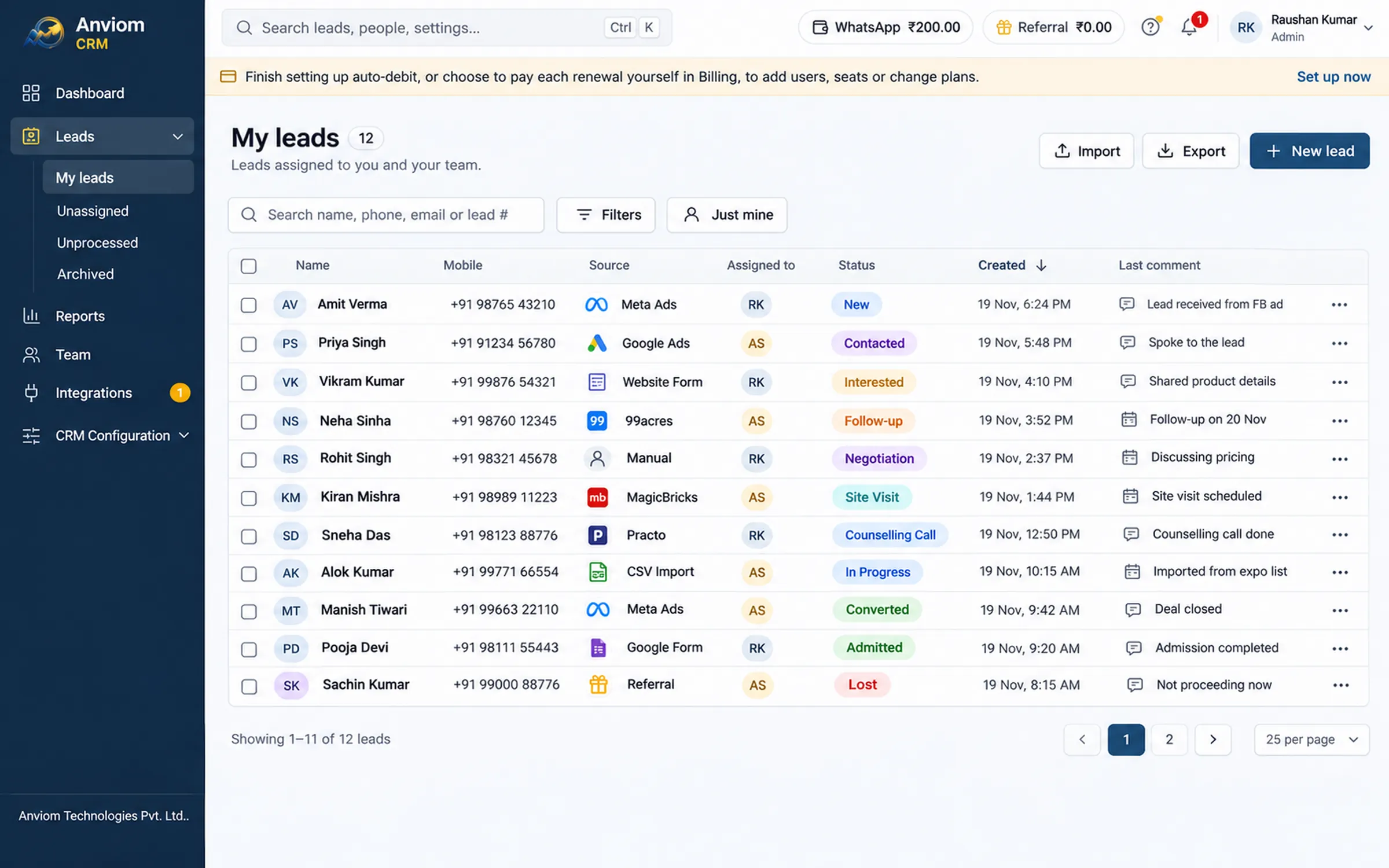
When you connect your Facebook page on the Integrations page, leads from your Facebook and Instagram lead forms arrive in Anviom CRM automatically. Each form question is mapped to a CRM field. When a form has a new question, AI suggests the matching field, and nothing changes until an Admin confirms it.
Other enquiries come in by CSV import, where you map the spreadsheet's columns and get a per-row error report, or are added by hand from Add lead - useful for walk-ins and phone calls. City names typed in fancy fonts are cleaned up, and a missing city is filled in from the PIN code.
- Leads sharing a phone number or email are flagged as duplicates, and a repeat enquiry goes back to the person who already has it when they can take leads.
- If a Facebook lead can't be fetched, for example because the login expired, it waits in Leads > Unprocessed and is processed again - not lost.
2. Give every lead an owner at once
On every plan, Organization-wide automatic assignment on the Assignment rules page shares new leads in turn across everyone who can take leads. The Admin never gets leads, and people on leave or with their lead flow paused are skipped.
On Professional you add assignment rules: for example, when a lead's City is Pune or Pimpri, send it to the Pune territory, and give it to whoever there has the fewest leads. Rules are checked from the top and the first match wins. A lead that matches no rule is shared in turn across the organisation, or waits in Leads > Unassigned if that switch is off. The owner gets a WhatsApp alert the moment a lead is assigned (Professional, paid from the WhatsApp wallet).
3. Make the follow-up happen
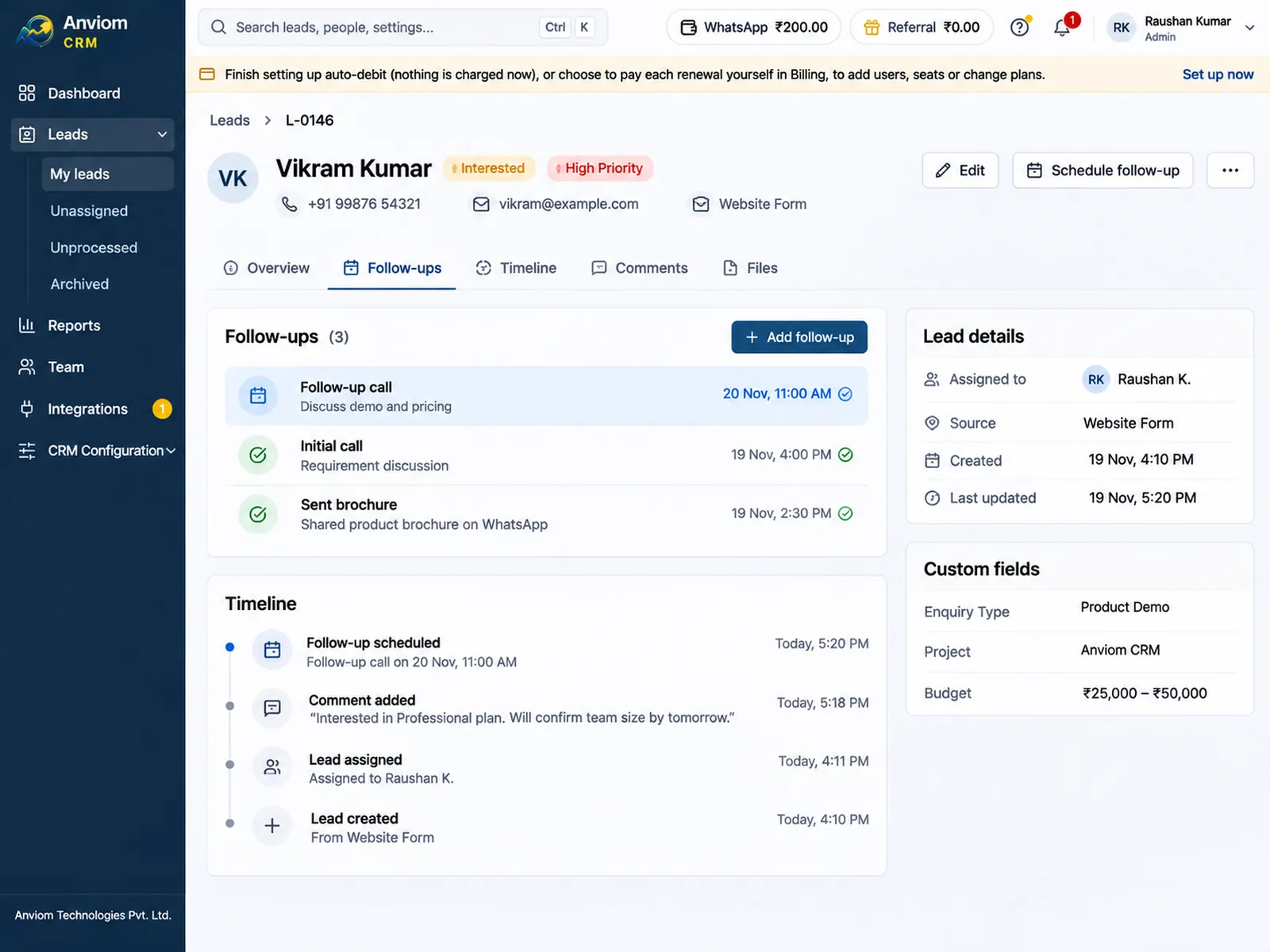
Open a lead and choose Add follow-up to set the date, time and a short note. Statuses such as Call back can ask for a follow-up date automatically. You are reminded before it is due - in the app, on the web, and on WhatsApp if your organisation uses WhatsApp alerts - and overdue follow-ups show on the dashboard.
Every call, note, status change, transfer and file stays on one timeline per lead, so whoever picks it up knows the whole story. While someone is on approved leave, their follow-up reminders go to their nearest available manager.
4. See what converts
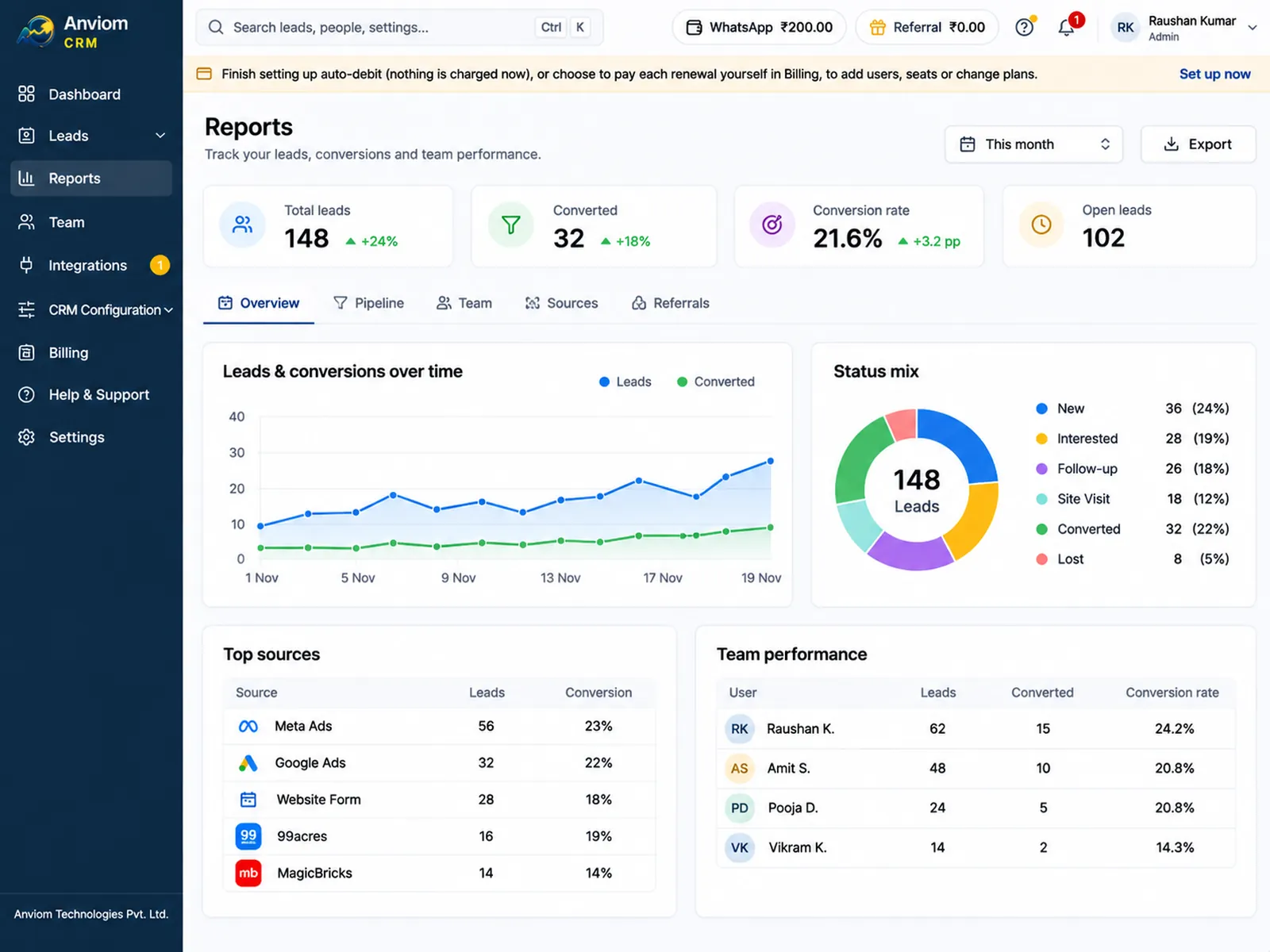
The Reports page shows leads created, converted, conversion rate, open pipeline and leads idle for 7 days or more, with tabs for Pipeline, Team, Sources, Transfers and Referrals. Team and campaign performance reports are on Professional. Each manager sees only the leads their role allows - their own, their team's, their department's, their reporting line's or everyone's.
What to look for in lead management software
Use this checklist to compare tools, including ours, with your own leads during a trial.
- Do leads from your ads arrive by themselves, or does someone download and upload them?
- Does every new lead get an owner without a manager sharing it out - and can you see what happens to a lead no rule catches?
- Can you route by the fields that matter to you, such as city, project, course or branch, including answers from your own lead forms?
- Are people on leave skipped automatically, and do their follow-ups reach someone else?
- Does every status change ask for the next follow-up, with a reminder on the phone the salesperson actually uses?
- Are duplicates caught, so the same person isn't called by two people?
- Can a manager see only their own team's leads, and can you limit who exports data?
- Where is your data stored, and is there a record of who did what?
- Is the price per user clear, with GST stated, and can you pay yearly?
Spreadsheets and WhatsApp groups, a generic CRM, or Anviom CRM
A general comparison of approaches. The middle column describes no particular product - check any CRM you shortlist against your own needs.
| Spreadsheet or WhatsApp group | Generic CRM | Anviom CRM | |
|---|---|---|---|
| Facebook and Instagram lead-ad leads | Downloaded or forwarded by hand | Depends on the product; may need an add-on or a connector | Arrive automatically, with form questions mapped to fields |
| Who owns a new lead | Whoever replies first or the manager decides | Usually configurable; check whether it is on your plan | Assigned on arrival - organisation-wide in turn, or by rules and territories on Professional |
| People on leave | Leads keep landing on them | Varies | Skipped automatically; reminders go to their manager |
| Follow-up reminders | Memory or phone alarms | Usually included | Reminders in the app, on the web and on WhatsApp (Professional) |
| Duplicate enquiries | Spotted only if someone notices | Varies | Flagged by phone or email; repeat enquiry goes back to its owner |
| Who sees which leads | Everyone in the group sees everything | Usually role-based | Own, team, department, reporting line or everyone, by role |
| Data location | Wherever the file or chat is | Ask the vendor | India, AWS Mumbai region |
| Price | No software cost | Varies by vendor and plan | Rs 399 or Rs 699 per user per month, GST included |
Pricing and data
- Starter: Rs 399 per user per month, 5 users included.
- Professional: Rs 699 per user per month, 10 users included, with team, territory and round-robin assignment, advanced reports and WhatsApp alerts.
- Prices include GST and online payment charges. Annual billing saves about 20%.
- Customer data stored in India, in the AWS Mumbai region.
Questions
What is lead management software?
Is lead management software the same as a CRM?
Which lead sources does Anviom CRM support today?
What happens to a lead nobody can take?
Can we try it before paying?
Where is our data stored?

Read more
- Affordable CRM for small businesses in India
- CRM for Facebook & Instagram lead ads
- Privyr alternative: Anviom CRM compared
- CRM vs spreadsheets and WhatsApp groups
- TeleCRM alternative: Anviom CRM compared
- LeadSquared alternative: Anviom CRM compared
- Zoho CRM alternative: Anviom CRM compared
- Lead distribution software: automatic lead assignment
- CRM for Instagram lead ads
- Sales CRM for small teams in India
- Lead routing by territory, city and project
- Sell.do alternative: Anviom CRM compared
- Meritto alternative: Anviom CRM compared
- WhatsApp alerts for new leads and follow-ups
- All features
- Frequently asked questions

See Anviom CRM with your own lead flow
We'll walk you through capture, assignment and follow-ups — set up around how your team works.