

Lead routing
Route every lead to the team that covers it - by city, project or any field
Lead routing decides which team a new lead belongs to: the city it came from, the project or course it asked about, the branch it chose, or any other answer on your form. In Anviom CRM, assignment rules send each lead to a territory, and someone in that territory gets it automatically.
Routing and distribution are two different questions
Routing answers "which team should handle this lead?" A Pune enquiry should not reach your Mumbai team, and a NEET enquiry should not reach the counsellor who handles commerce courses. Distribution answers the next question: "which person in that team, so the load stays fair?"
This page is about routing - rules, territories, rule order and what happens when nothing matches. Sharing leads fairly within a team, leave and reassignment are covered on our lead distribution page.
The two building blocks: territories and rules
A territory is a named group of people who take one kind of lead - Pune team, North zone, Project Green Valley or Whitefield clinic. You create territories in Team > Structure > Territories, add members and switch on Gets leads for each person who should receive leads automatically. The members list shows who can receive leads right now, and why not if they can't.
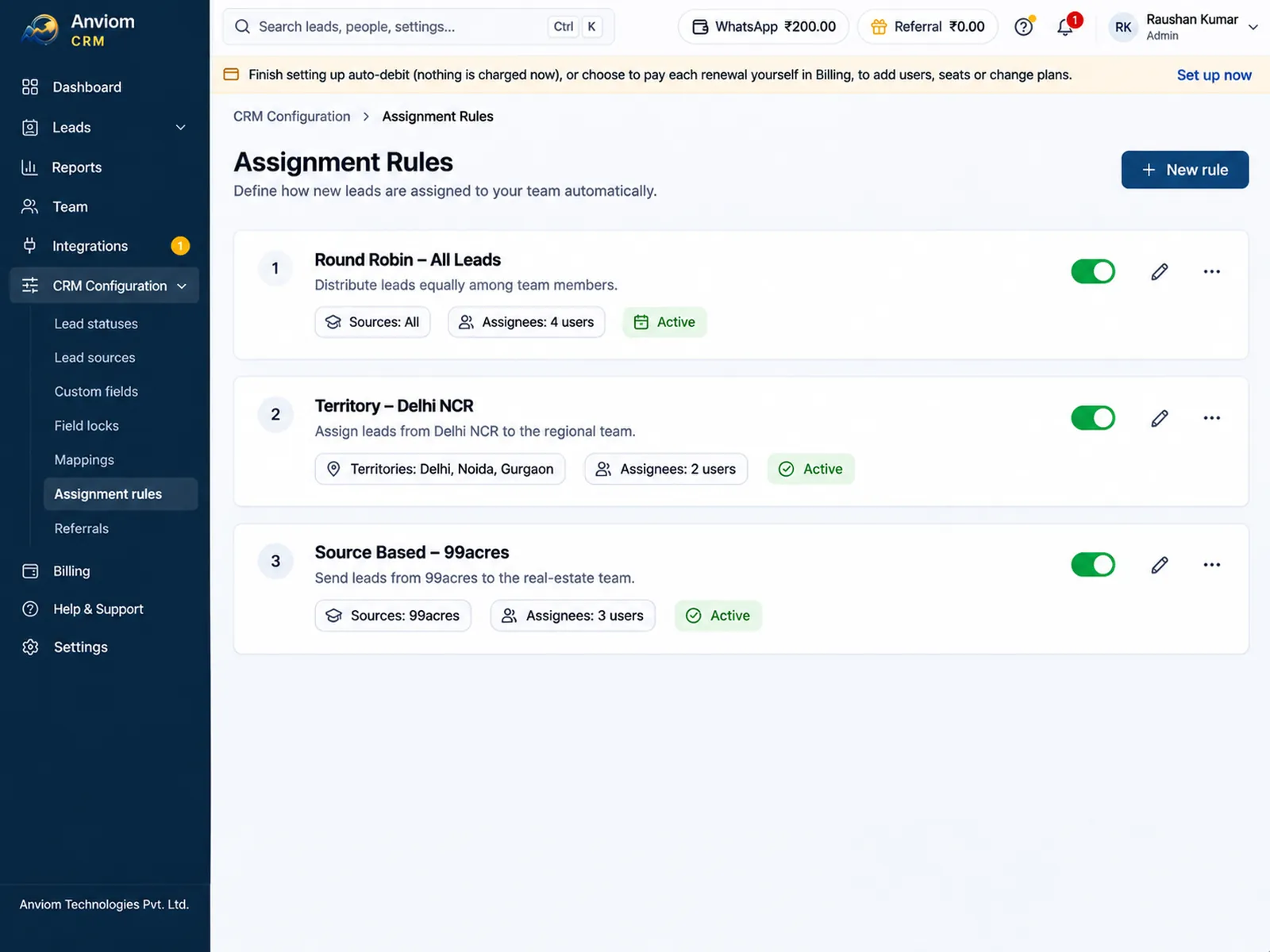
A rule says which leads go to a territory. You add rules in CRM Configuration > Assignment rules with New rule, which opens a simple sentence: When a lead's [City] is [Delhi, Noida] - send it to [North territory]. You pick the field, tick one or more answers, choose the territory, and choose who in the territory gets it: in turn one by one, whoever has the fewest leads, or I'll assign it myself.
What a rule can check
- Lead fields such as city, state, source and priority.
- Your own custom fields - course, project, budget, branch.
- Any question from your lead forms, for example "Which project are you interested in?" or "Your PIN code".
- The ad campaign, ad set, ad or form the lead came from.
- In the simple form, every condition must hold. The Advanced form adds ANY-condition rules and checks such as contains any of, is not, greater than and is empty.
- Capital letters, punctuation and extra spaces don't matter; spelling does, so pick answers from the list.
Rule order, and what happens when nothing matches
A new lead is checked against the rules from the top of the list down. The first rule it matches decides its territory, and the rules below are not checked. A new rule is added at the bottom, so drag it up if it is more specific than the rules above it. You can pause a rule without deleting it.
If no rule matches, the page says exactly what happens under Leads that match no rule: with Organization-wide automatic assignment on, the lead is shared in turn across everyone who can take leads; with it off, it waits in Leads > Unassigned for someone to assign. The same fallback applies when a rule matches but nobody in its territory can take leads right now. A rule set to I'll assign it myself is different: the lead gets the territory and always waits in Unassigned for a person to give it out.
One check comes before all rules: if a new lead is a duplicate of an existing one, it goes back to the person who already owns that lead, as long as they can take leads.
Example: a coaching institute routing by course and city
An institute with centres in Kota and Jaipur runs one Facebook form asking for course and city. It creates three territories - Kota NEET, Kota JEE and Jaipur - and three rules in this order: Course is NEET and City is Kota, to Kota NEET; Course is JEE and City is Kota, to Kota JEE; City is Jaipur, to Jaipur.
A NEET enquiry from Kota stops at rule 1. A JEE enquiry from Jaipur skips the first two and stops at rule 3. A Foundation enquiry from Ajmer matches nothing, so it follows the fallback - shared across all counsellors in turn, or waiting in Unassigned for the admissions head.
Example: real estate by project and PIN code
A developer selling two projects in Pune asks "Which project?" and "Your PIN code" on its lead form. Rule 1: Which project is Green Valley - to the Green Valley site team. Rule 2: Your PIN code is 411057, 411033 or 411045 - to the Hinjewadi team, for buyers near that office. A Green Valley enquiry from 411057 goes to the Green Valley team, because rule 1 is checked first. Swap the order if location should win.
Example: a clinic routing by branch
A clinic chain asks "Preferred branch" on its form and creates one territory per branch, with that branch's front-desk coordinators as members. Each rule sends one branch to its territory. The Koramangala territory uses first available by priority from the Advanced form, so the senior coordinator gets the branch's leads while available, and the next person in the set order takes over when they are on leave or paused.
Test before you switch it on
- In the rule form, Try it shows where your last few leads would go with this rule.
- Under Test rules against a lead, enter a lead number to see which rule it matches and the values the rules see. Nothing is changed.
- Each routing decision is recorded with the rule that matched.
- If someone types a PIN code instead of a city, or leaves the city out, the city and state are filled in from India Post's PIN code list, so city rules still match.
Questions
Which plan includes lead routing?
What is the difference between routing and round-robin?
Can one person be in more than one territory?
Can we route by fields from our lead forms?
What if two rules both match a lead?

Read more
- Affordable CRM for small businesses in India
- CRM for Facebook & Instagram lead ads
- Privyr alternative: Anviom CRM compared
- CRM vs spreadsheets and WhatsApp groups
- TeleCRM alternative: Anviom CRM compared
- Lead management software for Indian sales teams
- LeadSquared alternative: Anviom CRM compared
- Zoho CRM alternative: Anviom CRM compared
- Lead distribution software: automatic lead assignment
- CRM for Instagram lead ads
- Sales CRM for small teams in India
- Sell.do alternative: Anviom CRM compared
- Meritto alternative: Anviom CRM compared
- WhatsApp alerts for new leads and follow-ups
- All features
- Frequently asked questions

See Anviom CRM with your own lead flow
We'll walk you through capture, assignment and follow-ups — set up around how your team works.